6. The Framework
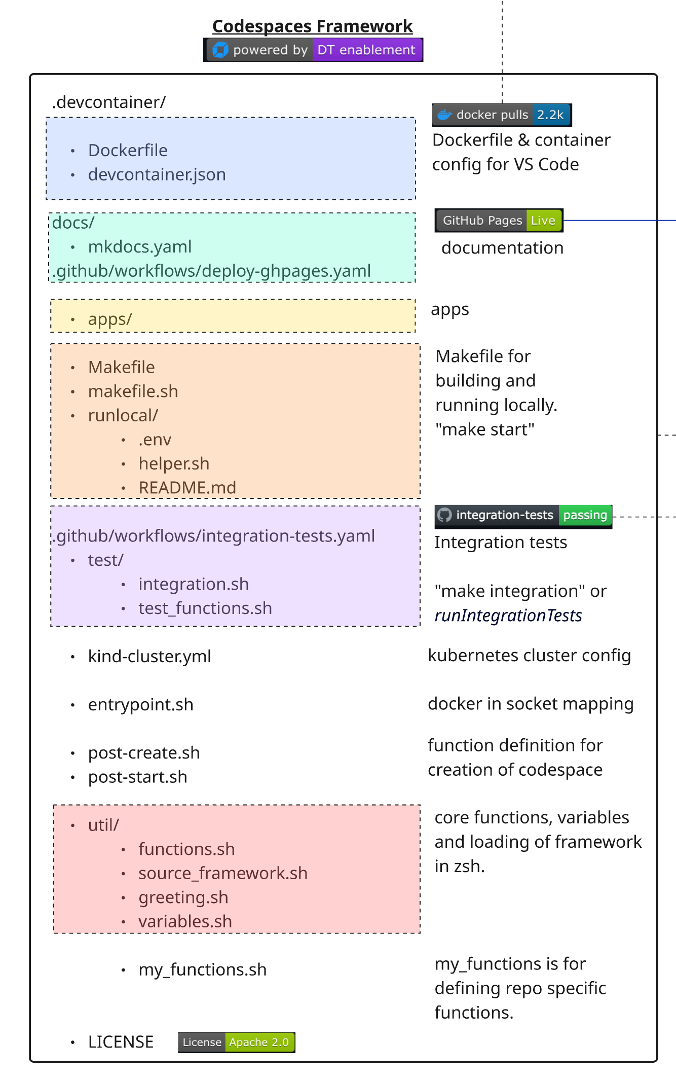 This section outlines the structure and purpose of each component in the Codespaces Enablement Framework, as visualized in the architecture diagram.
🏗️ Versioned Pull Model#
The framework uses a versioned cache model where consumer repos pull framework files at runtime instead of storing them locally. Each repo pins a FRAMEWORK_VERSION and only keeps custom files.
How the Cache Works#
When a container starts, source_framework.sh resolves framework files through a three-tier cache:
- Container cache (
$HOME/.cache/dt-framework/<version>/) — fastest, lost on rebuild - Host cache (
.devcontainer/.cache/dt-framework/<version>/) — persists across rebuilds - Git clone — fallback, clones from
codespaces-frameworkat the pinned tag via sparse-checkout
source_framework.sh
  ├── DEV MODE (functions.sh exists locally) → source directly
  └── CACHE MODE (consumer repos)
       ├── Tier 1: Container cache hit → source from cache
       ├── Tier 2: Host cache hit → copy to container, source
       └── Tier 3: git clone --sparse → populate both caches, source
File Classification#
Files in .devcontainer/ are classified into categories that determine how the framework manages them:
Category A — Framework-owned (removed from repos, pulled from cache)#
| File | Purpose |
|---|---|
util/functions.sh |
Core framework functions (the main library) |
util/variables.sh |
Global variables, colors, port ranges |
util/greeting.sh |
Terminal welcome message |
test/test_functions.sh |
Test assertion functions (reference) |
makefile.sh |
Docker build/run logic for local development |
runlocal/helper.sh |
ENV file loader, repo name resolver |
Dockerfile |
Base image build (consumers pull pre-built image) |
entrypoint.sh |
Docker socket GID mapping |
kind-cluster.yml |
Legacy location (moved to yaml/kind/) |
apps/ |
Demo applications (astroshop, todo-app, etc.) |
p10k/ |
PowerLevel10k zsh theme config |
yaml/ |
Dynakube manifests, Kind cluster config |
Category B — Thin wrappers (replaced during migration)#
| File | Purpose |
|---|---|
Makefile |
Bootstraps cache, delegates to cached makefile.sh |
Custom files — Repo-specific (never removed)#
| File | Purpose |
|---|---|
devcontainer.json |
Container config (image, runArgs, secrets) |
post-create.sh |
Repo-specific setup automation |
post-start.sh |
Repo-specific post-start actions |
util/source_framework.sh |
Version pin + cache logic |
util/my_functions.sh |
Repo-specific custom functions |
test/integration.sh |
Repo-specific integration tests |
.env |
Secrets for local runs and MCP (gitignored) |
manifests/ |
Repo-specific K8s manifests |
Image Tiers#
Defined per repo in repos.yaml via the image_tier field:
| Tier | Description | Default |
|---|---|---|
minimal |
Core framework only | — |
k8s |
Core + Kind cluster, entrypoint, Dynakube yaml | ✅ |
ai |
Same as k8s (extensible for future AI-specific files) | — |
After Migration — Clean Repo Structure#
.devcontainer/
  devcontainer.json      # Container config
  .env                   # Secrets (gitignored)
  post-create.sh         # Repo-specific setup
  post-start.sh          # Repo-specific post-start
  Makefile               # Thin wrapper → delegates to cache
  .cache/                # Framework cache (gitignored)
  util/
    source_framework.sh  # Version pin + cache mechanism
    my_functions.sh      # Custom functions
  test/
    integration.sh       # Repo-specific integration tests
  manifests/             # Repo-specific K8s manifests (if any)
Everything else comes from the framework cache at the pinned FRAMEWORK_VERSION.
🟦 Container Configuration#
Defines the development container for VS Code and Codespaces.
- devcontainer.json: Main configuration file. Defines the pre-built image (
shinojosa/dt-enablement), runtime arguments, volume mounts, lifecycle hooks, and secrets. Extensions are kept empty to ensure portability across platforms (ARM and AMD). .env: Secrets and environment variables for local runs and MCP server. Located at.devcontainer/.env(gitignored). Used by all instantiation types: Codespaces reads from GitHub secrets, VS Code/Docker reads from this file.
🟩 Documentation Workflow (docs/)#
- docs/: Contains all documentation and site configuration.
- mkdocs.yaml: Per-repo config using
INHERIT: mkdocs-base.yamlto inherit the framework's base theme, extensions, and plugins. Only repo-specific fields are defined here —training_name,site_name,repo_name,repo_url,nav, andextra.rum_snippet. A consuming repo defines notheme:and noextra_css:of its own; everything visual comes from the base. training_name: the training's display name, read by Orbital — not an MkDocs key. ENH-009 split a training's identity from its name: the identity is<org>/<repo>and is never shown, the name is only ever displayed. Orbital resolves the name through three rungs, in order:training_name, thensite_namewith theDynatrace Enablement/Observability Lab:prefix stripped, then the repo name. Declaring rung 1 lets a repo say what the training is called without that also having to be the docs site's page title. Two things about it are load-bearing. It must sit at column 0 — Orbital anchors its match on line start, so moving it underextra:to tidy it away would parse fine as YAML and be invisible to Orbital. And MkDocs does not know the key, so every build logsUnrecognised configuration name: training_name; that warning is expected. Consuming repos build with plainmkdocs buildand stay green, but this repository's ownvalidate-docs.yamlusesmkdocs build --strict, where the same warning is fatal — so do not addtraining_nameto this repository'smkdocs.yamlor tomkdocs-base.yaml.- mkdocs-base.yaml: Framework-owned base configuration — Material theme, a dark-first custom Dynatrace palette, the markdown extensions, and the two asset references
extra_css: stylesheets/extra.cssandextra_javascript: javascripts/mermaid.min.js. Those assets live in this repository and are fetched at build time at the repo's pinnedFRAMEWORK_VERSION, which is why none of the three files is committed in a consuming repo. A repo must fetch every asset the base references: MkDocs does not warn about a missingextra_cssorextra_javascripttarget — not even under--strict— it just emits a tag pointing at a 404..github/scripts/check_referenced_assets.pyis the check that does catch it. - .github/workflows/deploy-ghpages.yaml: GitHub Actions workflow that builds the site and publishes it to GitHub Pages. The trigger differs between this repository and the repos that consume it. Here, publication happens on push to
mainonly — that is, after a pull request is merged. In consuming repos, it still triggers on push tomainanddocs/*, so a push to adocs/*branch publishes the public site before review. - .github/workflows/validate-docs.yaml: builds the site with
mkdocs build --strictand checks the referenced assets, without publishing — it holds nopages: writepermission and no environment. It runs on pull requests tomainand on pushes todocs/**andrfe/**. This workflow exists in this repository only; consuming repos have no build-without-publish check.
Live documentation, locally#
Inside the dev container:
- installMkdocs: installs the pinned MkDocs requirements from
docs/requirements/requirements-mkdocs.txt, then callsfetchMkdocsBaseandexposeMkdocs. - fetchMkdocsBase: if
mkdocs.yamlstarts withINHERIT:andmkdocs-base.yamlis missing, it downloads that file from the framework at the pinnedFRAMEWORK_VERSION. This is the step that makes a fresh clone previewable — without itmkdocs servefails on the missing inherit target. - exposeMkdocs: starts
mkdocs serveon port 8000 in the background and exposes it appropriately for the instantiation type (forwarded port in Codespaces, ingress where one exists,localhost:8000otherwise).
Local preview renders unstyled if the stylesheet is missing
fetchMkdocsBase retrieves mkdocs-base.yaml only. docs/stylesheets/extra.css — the file that
carries the Dynatrace visual language — is fetched by the docs CI workflow, not by the local
preview, so a local build of a consuming repo shows correct content with default Material styling.
To preview with the real theme, fetch it the same way CI does:
FRAMEWORK_VERSION=$(grep -oP ':-\K[^}"]+' .devcontainer/util/source_framework.sh | head -1)
mkdir -p docs/stylesheets
curl -fsSL "https://raw.githubusercontent.com/dynatrace-wwse/codespaces-framework/${FRAMEWORK_VERSION}/docs/stylesheets/extra.css" \
  -o docs/stylesheets/extra.css
mkdocs serve works straight out of a clone.
Deploying to GitHub Pages#
- deployGhdocs: Builds and deploys the documentation to GitHub Pages using
mkdocs gh-deploy.
🟨 App Repository (apps/)#
This directory contains the application code and sample apps. Each app has its own subfolder inside apps/ in the framework cache.
Nginx Ingress + App Exposure#
Apps are published through nginx ingress-nginx on port 80. Each registerApp call creates an Ingress with three rules so the app is reachable in every instantiation type without any extra configuration:
| Rule | Matches | Example URL | Environment |
|---|---|---|---|
<app>.<public-ip>.sslip.io |
sslip.io magic-DNS host | http://todoapp.203.0.113.10.sslip.io |
VS Code / local container / remote VM |
<app>.<hostname> |
machine hostname | http://todoapp.codespace-abc123 |
VS Code / Host-header curl in CI |
| (catch-all, no host) | any other Host header | https://{name}-80.app.github.dev |
GitHub Codespaces |
sslip.io is a wildcard DNS service that resolves <anything>.<ip>.sslip.io directly to <ip>. No DNS record management needed.
How each environment reaches the app#
Port 80 on the host maps directly to the nginx ingress LoadBalancer. The app is reachable via its sslip.io URL:
Browser → http://todoapp.203.0.113.10.sslip.io
              DNS: sslip.io resolves to 203.0.113.10
              nginx ingress matches Host header → todoapp service:80
devcontainer.json forwards port 80: "forwardPorts": [80]
Codespaces forwards port 80 from the container and exposes it at {codespacename}-80.app.github.dev. Incoming requests carry a Host header that nginx doesn't recognise (it contains the Codespace name, not the sslip.io pattern). The catch-all ingress rule (no host: field) handles these:
Browser → https://{codespacename}-80.app.github.dev
              Codespaces tunnel → container port 80
              nginx: no host rule matches → catch-all → primary app service:80
getAppURL returns https://${CODESPACE_NAME}-80.app.github.dev automatically.
Multiple apps in one Codespace
When multiple apps are registered the last one registered owns the catch-all. Secondary apps are still reachable via their sslip.io host (app.127.0.0.1.sslip.io) — detectIP() returns 127.0.0.1 in Codespaces which resolves back to the container.
On the ops server, ports 80/443 are owned by the server's own nginx. Each CI job gets a K3d cluster on a non-default port (K3D_LB_HTTP_PORT=30080). The assertRunningApp test function probes via Host-header curl — no browser needed:
# assertRunningApp sends:
curl --fail --max-time 5 \
  -H "Host: todoapp.203.0.113.10.sslip.io" \
  http://localhost:30080
The Host header matches the sslip.io ingress rule; nginx routes correctly even on the non-default port.
IP detection (detectIP)#
| Condition | IP used | Result |
|---|---|---|
$EXTERNAL_IP set |
that value | explicit override |
| GitHub Codespaces | 127.0.0.1 |
sslip.io host resolves to loopback; catch-all handles Codespaces URL |
| Otherwise | public IP via ifconfig.me, fallback hostname -I |
standard sslip.io URL |
Apps are registered with registerApp <name> <namespace> <service> <port> which creates the Ingress resource and writes to the app registry (~/.cache/dt-framework/app-registry). The registry persists across shell sessions so deployApp can show status even after a restart.
Managing Apps with deployApp#
The deployApp function deploys and undeploys applications to your Kubernetes cluster:
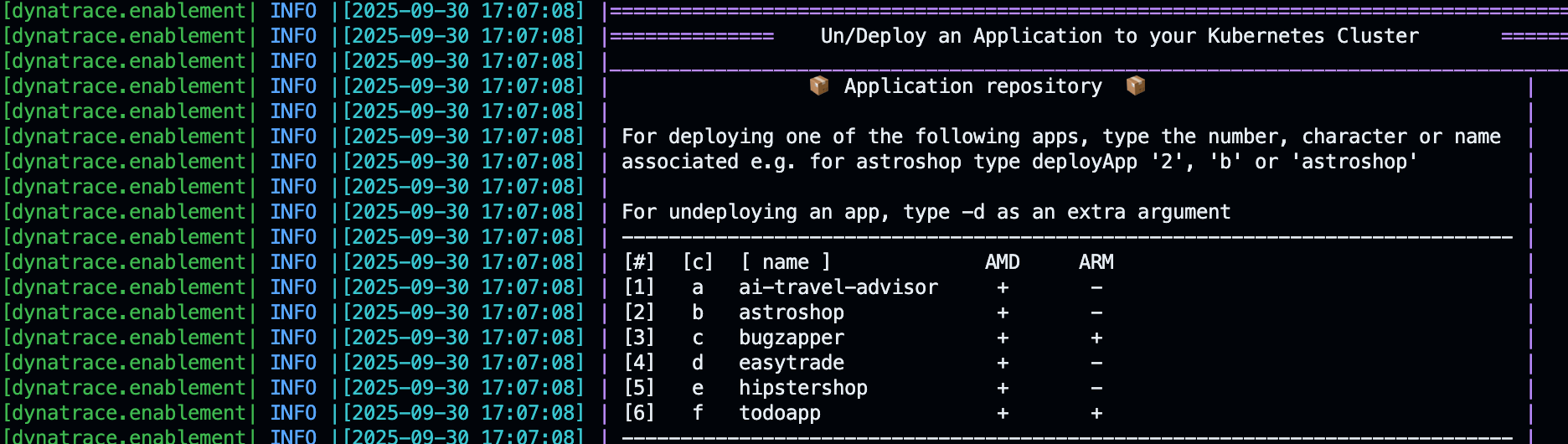
To deploy an app#
To undeploy an app#
🟧 Running Locally#
To quickly start a local development container:
The thin Makefile bootstraps the framework cache (if missing) and delegates to the cached makefile.sh. Available targets:
| Target | Description |
|---|---|
make start |
Build if needed, run or attach to container |
make build |
Build Docker image |
make build-nocache |
Full rebuild without cache |
make buildx |
Multi-arch build (amd64/arm64) with push |
make integration |
Run integration tests in container |
make clean-cache |
Clear the framework cache |
make clean-start |
Kill containers, clear cache, fresh start |
The Makefile generates a cached_makefile.sh wrapper during bootstrap that correctly sets ENV_FILE, RepositoryName, and VOLUMEMOUNTS to point to the repo (not the cache), ensuring backward compatibility with any cached framework version.
🟪 GitHub Actions & Integration Tests#
Automation for CI/CD and integration testing:
- .github/workflows/integration-tests.yaml: Runs integration tests on every PR. The
mainbranch is protected — the integration-test check must pass before merging. - test/integration.sh: Repo-specific test runner. Loads the framework, then runs assertions.
Integration Test Function#
- runIntegrationTests: Triggers integration tests by running the repo's
test/integration.shscript.
These assertions check that required pods are running and the application is accessible. If any assertion fails, the PR is blocked from merging. The full list of assertions, including three that are placeholders and can never fail, is in Testing.
🟫 Kubernetes Cluster#
The framework supports two Kubernetes engines, selected by the CLUSTER_ENGINE variable. K3d is the default for all new labs.
| Engine | Variable | Strengths | When to use |
|---|---|---|---|
| K3d (default) | CLUSTER_ENGINE=k3d |
Fast startup, built-in LB, native ingress on ports 80/443, multi-worker | All new labs, CI/CD |
| Kind | CLUSTER_ENGINE=kind |
Real Linux kernel features in nodes | CloudNativeFullStack OneAgent (requires kernel namespaces) |
K3d Cluster (Default)#
K3d runs K3s (lightweight Kubernetes) inside Docker. It ships with a built-in LoadBalancer that maps host ports 80 and 443 directly to the nginx ingress controller — no NodePort tricks needed.
# K3d cluster created with:
k3d cluster create enablement \
  -p "80:80@loadbalancer" \
  -p "443:443@loadbalancer" \
  --k3s-arg "--disable=traefik@server:0"   # traefik replaced by nginx ingress
Configurable env vars (override before calling startK3dCluster):
| Variable | Default | Purpose |
|---|---|---|
K3D_CLUSTER_NAME |
enablement |
Cluster name |
K3D_LB_HTTP_PORT |
80 |
Host port → ingress HTTP |
K3D_LB_HTTPS_PORT |
443 |
Host port → ingress HTTPS |
K3D_API_PORT |
6443 |
Host port → k8s API server |
Orbital (ops server) overrides
On the CI/CD ops server, the host's own nginx already owns ports 80/443. Each CI job overrides to non-conflicting ports:
assertRunningApp reads K3D_LB_HTTP_PORT for its Host-header curl probe, so tests work correctly without any code changes.
K3d Cluster Functions#
| Function | Description |
|---|---|
startK3dCluster |
Start, attach to, or create the K3d cluster |
createK3dCluster |
Create cluster from env config, install nginx ingress |
attachK3dCluster |
Merge kubeconfig and switch context to k3d-enablement |
stopK3dCluster |
Stop the K3d cluster |
deleteK3dCluster |
Delete the cluster and all resources |
Aliases: startK3sCluster, createK3sCluster, attachK3sCluster, etc. map to the same functions for backward compatibility.
Kind Cluster (Alternative)#
Kind (Kubernetes IN Docker) creates Kubernetes nodes as Docker containers. Kind nodes have full Linux kernel access inside Sysbox containers, which enables OneAgent CloudNativeFullStack mode.
The Kind cluster config is at yaml/kind/kind-cluster.yml.
Kind Cluster Functions#
| Function | Description |
|---|---|
startKindCluster |
Start, attach, or create the Kind cluster |
createKindCluster |
Create cluster from yaml/kind/kind-cluster.yml |
attachKindCluster |
Configure kubeconfig for kind-kind context |
stopKindCluster |
Stop the Kind container |
deleteKindCluster |
Delete the cluster |
Unified Cluster API#
Use these regardless of engine — they route based on CLUSTER_ENGINE:
| Function | Description |
|---|---|
startCluster |
Start the cluster (K3d or Kind based on CLUSTER_ENGINE) |
stopCluster |
Stop the cluster |
deleteCluster |
Delete the cluster |
The kubectl client, helm, and k9s are automatically configured after startCluster.
🐳 Docker Socket Mapping (entrypoint.sh)#
The container accesses the host's Docker daemon via the mounted Docker socket (/var/run/docker.sock). The entrypoint.sh script (baked into the Docker image) handles:
- Host-to-container Docker GID mapping
- Hostname resolution in
/etc/hosts - User permission setup
This enables Kind and other Docker-based tools to work inside the dev environment.
🟦 Container Post-Creation & Start#
Repository-Specific Logic
Use these files to define logic for automating the creation and setup of your enablement.
-
post-create.sh: Runs after the container is created. Loads the framework, then executes setup steps:
.devcontainer/post-create.sh -
post-start.sh: Runs every time the container starts (e.g., refresh tokens, expose services).
🟥 Core Functions (util/)#
Reusable shell functions loaded into every shell session:
- functions.sh: Main library. Includes logging, Kubernetes helpers, deployment functions, environment management, and tracking. It also sources
test/test_functions.sh, which is why the test assertions are available in every shell. - source_framework.sh: Version-aware loader. Handles DEV MODE (local files) and CACHE MODE (two-tier cache with git clone fallback).
- greeting.sh: Welcome message with environment info. Call
printGreetingor open a new terminal. - variables.sh: Central variables (image versions, port ranges, ENV_FILE path).
Key variables (variables.sh)#
| Variable | Default | Description |
|---|---|---|
FRAMEWORK_VERSION |
pinned per repo | Framework tag to pull from cache |
MAGIC_DOMAIN |
sslip.io |
Wildcard DNS for app ingress hosts |
K3D_CLUSTER_NAME |
enablement |
K3d cluster name |
K3D_LB_HTTP_PORT |
80 |
K3d LB → ingress HTTP (Orbital overrides to 30080) |
K3D_LB_HTTPS_PORT |
443 |
K3d LB → ingress HTTPS (Orbital overrides to 30443) |
APP_REGISTRY |
~/.cache/dt-framework/app-registry |
Persisted ingress registrations |
CLUSTER_ENGINE |
k3d |
Cluster engine (k3d or kind) |
ENV_FILE |
.devcontainer/.env |
Secrets file path |
🟫 Custom Functions (my_functions.sh)#
my_functions.sh is the per-repo extension point — it is sourced after functions.sh, so it can override any framework function or add entirely new ones. Custom functions are called from post-create.sh and post-start.sh.
Common patterns#
| Pattern | How to implement |
|---|---|
| Deploy a custom app and register it | registerApp <name> <namespace> <service> <port> |
| Override a framework function | Redefine it in my_functions.sh (sourced last, wins) |
| Add DT credentials to a K8s secret | dynatraceEvalReadSaveCredentials then kubectl create secret ... |
| Wait for pods to stabilize | waitForAllReadyPods <namespace> |
| Deploy via Helm | Standard helm install inside the function |
| Use repo path | $REPO_PATH is exported by source_framework.sh |
Don't hardcode NodePort numbers
Older repos in the fleet used kubectl patch service ... nodePort: 30100 and forwarded that port from the container. With K3d + nginx ingress, port 80 is the single entry point. Use registerApp to create the Ingress (including the catch-all rule for Codespaces), and expose only port 80 in devcontainer.json.
# Old pattern — broken on K3d (NodePort 30100 not guaranteed; no Codespaces routing)
kubectl patch service frontend --type='json' \
  --patch='[{"op":"replace","path":"/spec/ports/0/nodePort","value":30100}]'
# devcontainer.json had: "forwardPorts": [30100]

# New pattern — works in VS Code, Codespaces, and Orbital
registerApp "myapp" "myapp" "frontend" 80
# devcontainer.json: "forwardPorts": [80]
# integration.sh:
assertRunningApp "myapp"
📄 License#
This project is licensed under the Apache 2.0 License.